
Last updated on
Nov 6, 2026
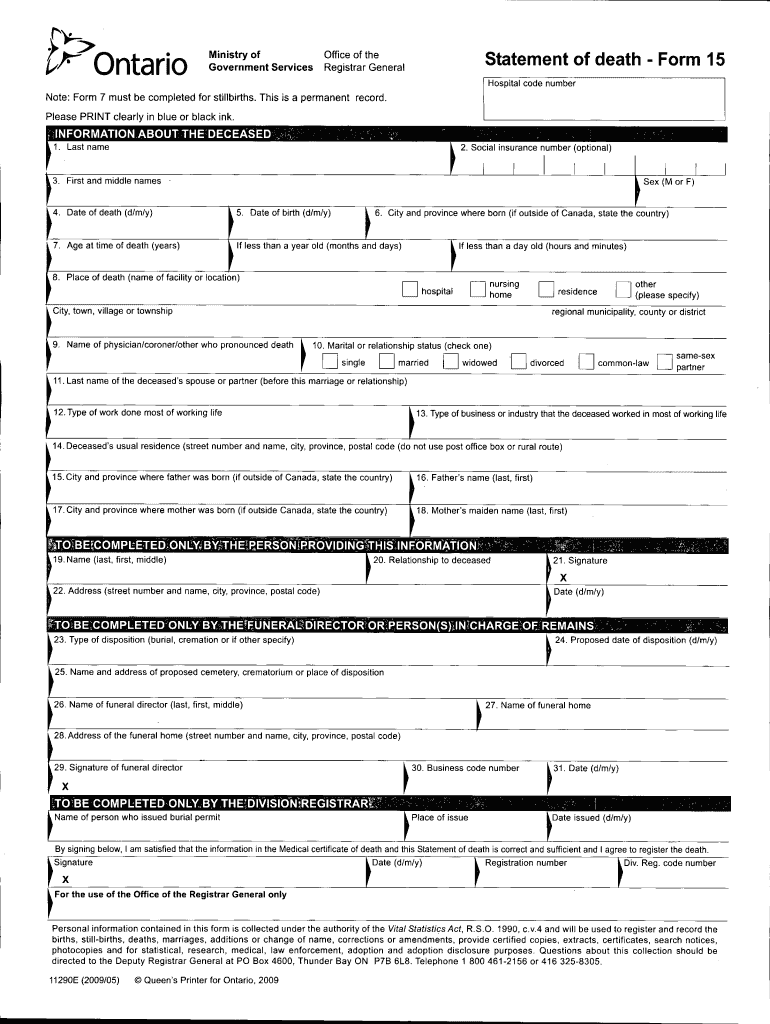
Get the free Ontario Statement of Death Form 15
We are not affiliated with any brand or entity on this form

Fill out
Complete the form online in a simple drag-and-drop editor.

eSign
Add your legally binding signature or send the form for signing.

Share
Share the form via a link, letting anyone fill it out from any device.

Export
Download, print, email, or move the form to your cloud storage.
Why pdfFiller is the best tool for your documents and forms


End-to-end document management
From editing and signing to collaboration and tracking, pdfFiller has everything you need to get your documents done quickly and efficiently.
Accessible from anywhere
pdfFiller is fully cloud-based. This means you can edit, sign, and share documents from anywhere using your computer, smartphone, or tablet.
Secure and compliant
pdfFiller lets you securely manage documents following global laws like ESIGN, CCPA, and GDPR. It's also HIPAA and SOC 2 compliant.
What is Death Form 15
The Ontario Statement of Death Form 15 is a government form used by funeral directors to register and record the death of an individual in Ontario.
pdfFiller scores top ratings on review platforms




If you need to type on a PDF this is the tool to use. Makes it very easy, worth the price.
What do you like best?
Program is very intuitive and easy to use. I spend less than 10 mins to recreate a document for Customers and it makes a world of difference.
What do you dislike?
I don't think I have any dislike...or at least none that I've come across too.
Recommendations to others considering the product:
It's a must have program...so easy to use and it does it all. Plus an extra bonus is that it's less in cost then the highest competitor. WIN, WIN!
What problems are you solving with the product? What benefits have you realized?
I edit our invoices & receipts. I'm able to provide progress invoices that our system doesn't do. This helps our Customers tremendously to understand paperwork.
What do you like best?
PDFfiller actually has lots of online tools that can help with many general document editing tasks. We can convert PDF files to lot of different document formats such as DOC files, which are files I use often at work. For document signing, editing and adding fillable fields is not complicated. The toolbar has tools that are neatly laid out and easy to access. There are lots of click-and-drag features that make using PDFfiller comfortable, even with hours of editing. There are also helpful collaboration options that let internal staff communicate about document edits.
What do you dislike?
From an admin perspective, it's been a delight working with PDFfiller, but some people that receive our digital documents can sometimes have trouble accessing the files and knowing how to sign them.
Recommendations to others considering the product:
PDFfiller can be a valuable solution if you need to make lots of edits to PDF files and don't have a much experience with more advanced software like Adobe Acrobat. It seems to be designed for beginner users, but can also work for more expert document editors.
What problems are you solving with the product? What benefits have you realized?
Even though I know how to use various popular PDF and document editing software, I often turn to PDFfiller to allow for more intuitive editing features and its abilities to work with just about any PDF we load into it. It's a versatile editing solution that lets us quickly format our documents to our specifications.
What do you like best?
The interface of PDFfiller is simple and intuitive. I think that most people can sign up and start using PDFfiller without having to spend much time figuring things out. Once we load a PDF into the system, there are straightforward menu items and labels that help to fill out virtually any form from start to finish. I can save to PDF format with my filled-in information or print right from the PDFfiller website.
What do you dislike?
Anytime I post my information online, I get apprehensive about how my data is being used. Though I'm sure PDFfiller probably takes measures to keep our uploaded and saved documents secure, I just never know with all the malware and server attacks that often occur, in general.
Recommendations to others considering the product:
Some people probably don't want to hassle with putting their documents through a digitized system, but I think once you upload one form to PDFfiller, you'll see how intuitive the entire process and may possibly not print out documents to fill them out anymore.
What problems are you solving with the product? What benefits have you realized?
My handwriting is basically terrible and I often get strains when writing since I typically haven't written by hand much over the past several years. PDFfiller lets me fill out PDF documents more effortlessly and lets me align text and other objects with great precision.
What do you like best?
I like the fact that live Customer service is always there to guide you if there's a problem.
What do you dislike?
The only thing I dislike if when a large corporation wants a form filled out and you use PDF Filler they come back and tell you their shop uses Adobe Acrobat and to please fill out the form once again using Adobe.
Recommendations to others considering the product:
I'd recommend it
What problems are you solving with the product? What benefits have you realized?
It has saved me many hours of editing and signing contracts and agreements
What do you like best?
The support team is very helpful and responds quickly.
What do you dislike?
The product was excellent our company is too small to make proper use of their services. I would have appreciated being able to purchase the service to use on an as-need basis.
What problems are you solving with the product? What benefits have you realized?
This product allowed me to make pdf forms that could be filled out online/electronically rather than printed, manually filled out and scanned.
Who needs Death Form 15?
Explore how professionals across industries use pdfFiller.

Death Form 15 is needed by:
-
Funeral Directors responsible for death registration
-
Family members of deceased individuals
-
Healthcare professionals issuing death certificates
-
Legal representatives managing estates
-
Vital statistics office staff
Comprehensive Guide to Death Form 15
What Is the Ontario Statement of Death Form 15?
The Ontario Statement of Death Form 15 is a crucial document in the death registration process in Ontario. It serves to officially register a death and is mandated by the Vital Statistics Act. This form requires specific information about the deceased, including their name, date of death, and place of death, as well as additional details like marital status and parents' names.
Completing this form is essential for legal documentation, ensuring that vital statistics records are accurately maintained. The information collected through the Ontario death registration form is vital for future reference and serves various administrative and legal purposes.
Purpose and Benefits of the Ontario Statement of Death Form 15
The Ontario Statement of Death Form 15 is essential for timely legal and personal matters following a death. First and foremost, it allows for the prompt registration of deaths, which is necessary for obtaining death certificates. These certificates are critical for families to settle insurance claims and estate matters.
In addition to its legal importance, this form contributes to accurate vital statistics records. By ensuring that the data is recorded correctly and promptly, families can benefit from a smoother grief process without unnecessary bureaucratic delays.
Who Needs the Ontario Statement of Death Form 15?
The responsibility of filling out the Ontario Statement of Death Form 15 typically falls on funeral directors, who are legally required to complete this form. In some cases, close relatives may also need to be involved, especially when specific details about the deceased’s life need clarification.
Funeral directors play a pivotal role in this process, as they are trained to handle the documentation accurately. Their involvement helps to facilitate the registration of the death, ensuring compliance with legal requirements.
How to Fill Out the Ontario Statement of Death Form 15 Online (Step-by-Step)
Filling out the Ontario Statement of Death Form 15 online is straightforward. Follow these steps to ensure you complete the form correctly:
-
Begin by entering the personal details of the deceased, including their first and middle names.
-
Fill in the date of death and the place of death accurately.
-
Provide information about the deceased’s marital status and their parents’ names.
-
Review the details carefully to ensure accuracy.
-
Complete any additional sections as required, following the prompt instructions.
Taking the time to ensure all information is accurate will help prevent delays in processing.
Common Errors and How to Avoid Them
When filling out the Ontario Statement of Death Form 15, it’s crucial to be mindful of common mistakes that can lead to delays in processing. Frequent errors include:
-
Incomplete fields that are mandatory for registration.
-
Incorrect dates, particularly in relation to the date of death.
-
Omitting necessary information about the deceased’s family members.
To avoid these issues, review the completed form multiple times before submission. Double-check all entries for accuracy to ensure compliance with registration requirements.
Required Documents and Supporting Materials
Submitting the Ontario Statement of Death Form 15 requires certain documents to be included. The primary document needed is the medical certificate of death, which must be completed by a qualified medical professional.
Additionally, supporting materials that may enhance the submission include:
-
A copy of the deceased’s identification, if available.
-
Any legal documentation regarding their estate or previous marriage(s).
Having these documents readily available at the time of form submission will streamline the registration process.
Submission Methods and Where to Submit the Ontario Statement of Death Form 15
The completed Ontario Statement of Death Form 15 can be submitted through several methods. You can choose to submit the form online or mail it in, depending on your preferences. If mailing, ensure the form is sent to the appropriate provincial office in Ontario for processing.
There may be associated fees with submitting the form, and it’s important to familiarize yourself with the payment options available to ensure smooth processing.
What Happens After You Submit the Ontario Statement of Death Form 15?
Once you submit the Ontario Statement of Death Form 15, the processing timeline typically varies. Users can expect to receive updates regarding their submission, including confirmation of receipt.
You will also be informed about the expected timeline for obtaining the death certificate and can track the status of your submission through the designated provincial resources.
Privacy, Security, and Compliance When Filling Out the Ontario Statement of Death Form 15
It’s essential to ensure your privacy and data security when completing the Ontario Statement of Death Form 15. Protecting personal data is a priority, especially when dealing with sensitive matters such as death registration.
pdfFiller emphasizes security through measures such as encryption and compliance with privacy regulations. Users can feel assured that their information is handled securely during the completion and submission process.
Using pdfFiller for the Ontario Statement of Death Form 15
Utilizing pdfFiller to fill out the Ontario Statement of Death Form 15 offers several advantages. This platform simplifies the process by providing an easy-to-use interface for completing the form, as well as options for digital signatures.
Moreover, pdfFiller ensures a smooth submission process and provides additional document management benefits, translating to a more efficient experience for users dealing with the unfortunate circumstances of a loved one’s passing.
How to fill out the Death Form 15
-
1.Access the Ontario Statement of Death Form 15 on pdfFiller by searching for the form name in the platform's search bar or through provided links.
-
2.Open the form and navigate through the various fields, such as 'First and middle names' and 'Date of death', using the toolbar tools for zooming or adjustments.
-
3.Before starting, gather necessary information including the deceased's full name, date and place of death, marital status, and details about parents' names and residential address.
-
4.Fill in each blank field carefully, ensuring all information is accurate. Use checkboxes for options where applicable, and refer back to the instructions included in the form if needed.
-
5.Once all fields are filled, review the form thoroughly to ensure accuracy and completeness. Correct any mistakes before proceeding to save or submit.
-
6.Finalize your form by saving it within pdfFiller. You can download a copy to your device or directly submit it according to the required submission methods outlined.
-
7.If you intend to send the form, ensure to follow up with any necessary supporting documents required for submission alongside the completed Ontario Statement of Death Form 15.

Who is eligible to complete the Ontario Statement of Death Form 15?
The Ontario Statement of Death Form 15 can be completed by funeral directors or authorized representatives of the deceased's estate. Family members may also assist in providing the necessary information.
What is the deadline for filing the Ontario Statement of Death?
It is advisable to submit the Ontario Statement of Death Form 15 as soon as possible after the occurrence of death, ideally within days, to avoid potential delays in issuing the death certificate.
What supporting documents are required for the Ontario Statement of Death?
Typically, a medical certificate of death is required alongside the Ontario Statement of Death Form 15. Ensure you collect all necessary documents before completing the form.
How should I submit the Ontario Statement of Death Form 15?
After completing the form, you can submit it to the local vital statistics office. Always check for specific submission guidelines as these may vary by location.
What are common mistakes to avoid when completing the form?
Common mistakes include providing inaccurate information, missing required fields, and failing to have the form signed by the funeral director. Double-check all details before submission.
How long does it take to process the Ontario Statement of Death?
Processing times for the Ontario Statement of Death vary, but it generally takes several weeks. It's best to submit the form promptly to avoid delays in obtaining the death certificate.
Is notarization required for the Ontario Statement of Death Form 15?
No, notarization is not required for the Ontario Statement of Death Form 15. The form needs to be signed by a funeral director for validation.
Related Forms




Related Catalogs
Get the latest insights from our blog


If you believe that this page should be taken down, please follow our DMCA take down process
here
.
This form may include fields for payment information. Data entered in these fields is not covered by PCI DSS compliance.